
Home / Guides / Hyperliquid trading bot
Your own Hyperliquid trading bot
Hyperliquid is one of the ten exchanges M Alpha Core supports. You scan a market, read the report, and your bot trades it on your own Hyperliquid account, day and night, with an API wallet that can trade but cannot withdraw.
Last updated:
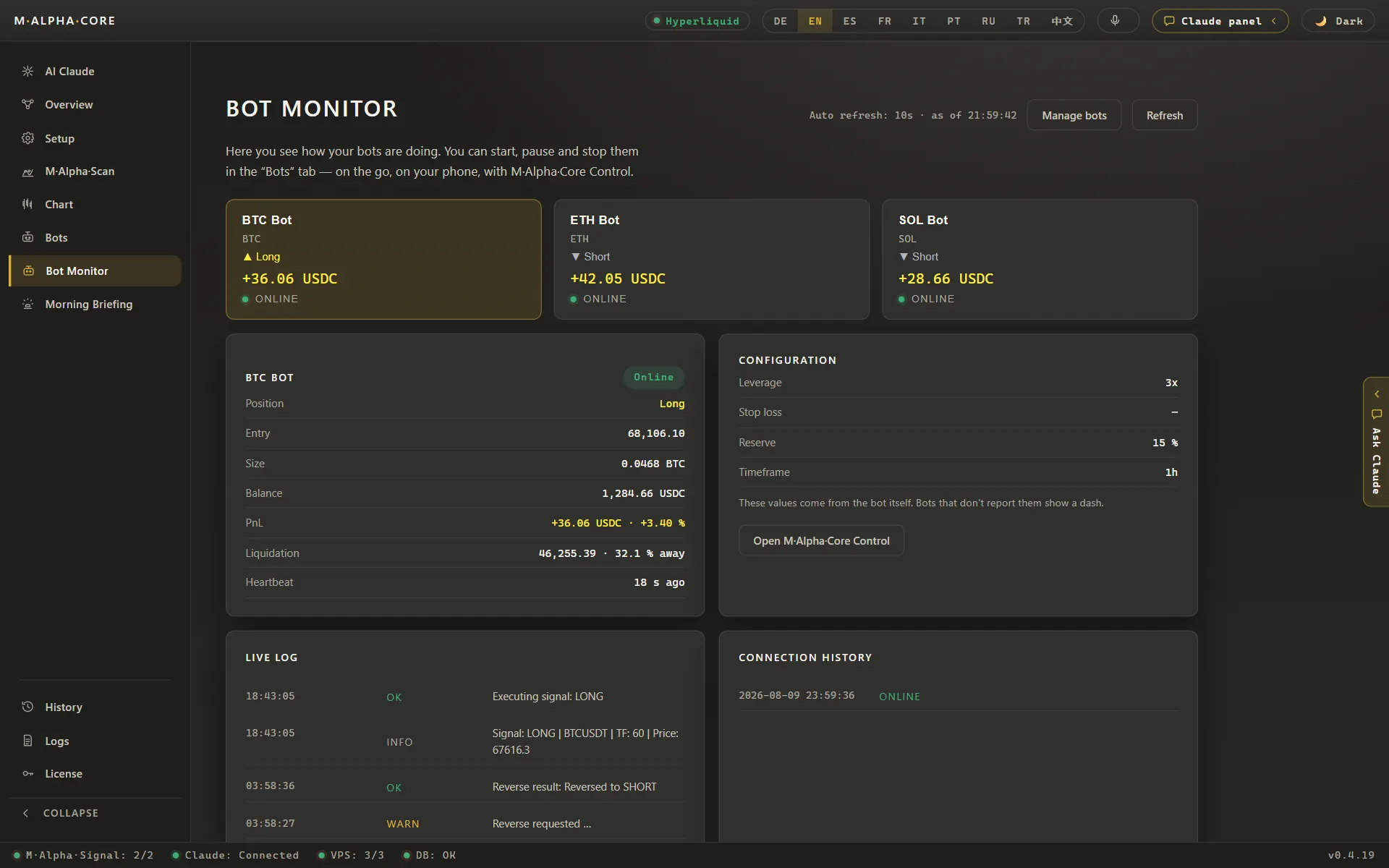
What the app does for Hyperliquid
| API wallet valid for | up to 180 days |
| Warning before expiry | yellow at 30 days, red at 14 |
| Withdrawals by the bot | not possible |
| Sub accounts | one per bot |
| Exchanges supported | 10, including Hyperliquid |
| Price of the app | from $49 a month |
An API wallet on Hyperliquid can trade but cannot withdraw. When it expires, every order of your bot is rejected. M Alpha Core counts down for every account so your bot never goes silent unnoticed.
What Hyperliquid is
Hyperliquid is a decentralized exchange for perpetual contracts. You do not open a classic account with a password. You connect a wallet, deposit margin and trade from that wallet. Orders are matched in an order book, much like on a large centralized exchange, and every fill can be checked on chain.
For a trading bot this has a clear advantage: you can give the bot its own API wallet. That wallet signs orders for your account, but it has no right to move money out. Even if someone got hold of the bot key, they could not withdraw your funds.
Why a bot on Hyperliquid?
Hyperliquid lists many coins and trades around the clock. Strong moves in BTC, ETH, SOL or HYPE happen at night just as often as during the day. A bot follows the same rules on every candle and does not miss the move because you were asleep. It also does not chase a move because you were nervous.
As with every market, the rules decide everything. M Alpha Core therefore tests the settings on a full year of data and on a part of the year the search never saw, before the bot ever places an order.
From scan to live bot
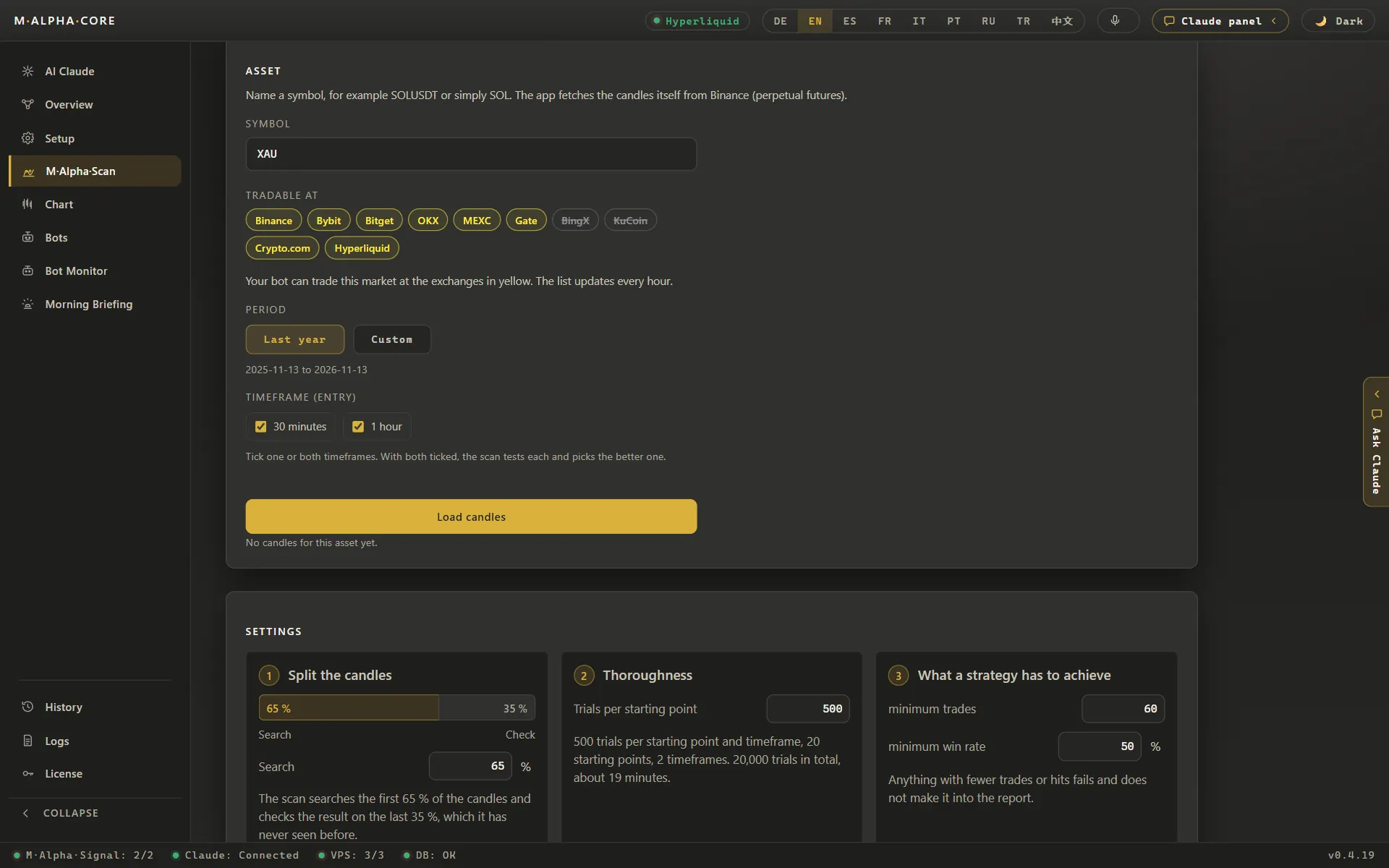
Pick a market such as BTC, ETH, SOL or HYPE and a time frame. The scan server tests thousands of settings of the built in strategy M Alpha Signal on the first 65 % of the year and checks the best ones on the last 35 %. If the result holds up there, you start a bot with exactly those settings. Our signal server calculates the signal with your settings and hands it to your bot, which then trades on Hyperliquid.
A real example from an ETH scan shows what the report tells you about risk. The strategy made 116 trades in one year on the 30 minute chart, with a win rate of 58.6 %. The worst move against a single trade was 15.64 %. That means any leverage above 6.39x would have liquidated that trade. The report puts this number right next to the profit, so you see both sides before you choose a leverage.
The API wallet and its expiry
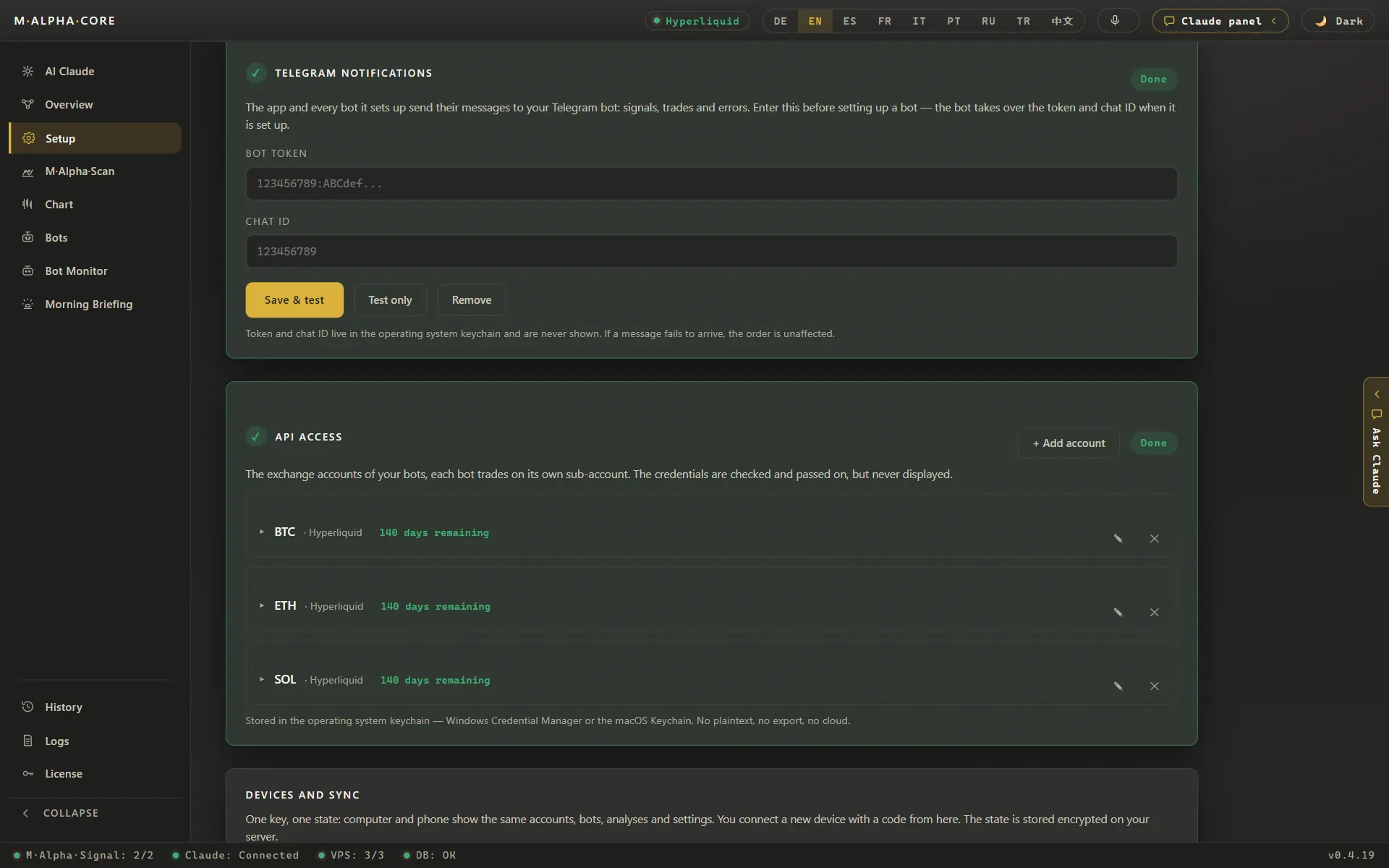
On Hyperliquid an API wallet is valid for at most 180 days. After the expiry date every order from that wallet is rejected. A bot that keeps sending signals into a dead wallet looks busy, but nothing happens on your account. This is one of the most common reasons why Hyperliquid bots stop trading without anyone noticing.
M Alpha Core keeps track of the expiry for every account. The app shows a yellow warning from 30 days before expiry and a red one from 14 days. You then create a new API wallet on Hyperliquid and enter it in the app, and the bot continues.
Every bot on its own sub account
As on all ten exchanges in M Alpha Core, each strategy runs on its own sub account, here a Hyperliquid sub account. If one strategy has a bad run, its losses stay in its own account and cannot pull margin away from your other bots. It also keeps the numbers clean: you see exactly what each bot made or lost, and the weekly check every Sunday compares that with what the bot would have made on its own.
One thing to know before you start: Hyperliquid offers sub accounts only from $100,000 in trading volume. For a first bot, Hyperliquid is therefore not the first choice; the other nine exchanges offer sub accounts from the start.
Set up a Hyperliquid bot step by step
- Install the app. M Alpha Core runs on Windows 10 and 11, on macOS 11 or newer (Apple Silicon and Intel) and on Android 10 or newer. Get it on the download page. One Standard license covers one computer and one phone, Pro covers three devices in any mix.
- Scan a Hyperliquid market. Choose a coin that Hyperliquid lists, for example BTC, ETH, SOL or HYPE. Pick a time frame and a date range, then start the scan. It runs on our scan server, so you can close the app or put your phone away while it works.
- Read the report. Look at the number of trades, the profit factor on the searched part and on the unseen part, the result with and without leverage, the worst move against a single trade and the leverage that move would have allowed. Open the chart and look at every trade, the losers included. The methodology page explains how each figure is calculated.
- Rent a small server and start your bot. The app walks you through renting a small server for about $12 a month and sets it up for you. Your bot first runs as a dry run: it only writes down what it would do and sends every step to your Telegram.
- Connect your exchange with a trading only key. On Hyperliquid you create an API wallet for your account and a sub account for the bot, and the app shows you where. Create an API key that may trade but may not withdraw. The key is stored in the protected vault of your device and on your own server. Our scan server never sees it. The security page explains how keys, servers and the control panel are protected.
- Go live when you are ready. A practice bot stays a practice bot, so for real money you set the bot up once more without the dry run tick. From then on it trades on your own account, and you can set it to long, short, reverse or stop with one tap in the app or in the control panel in your browser.
The app shows one screen per step, and the built in assistant explains the API wallet and the sub account if you have never used them before.
Every trade your bot makes on Hyperliquid also lands in the app's trade history, which you can export as a CSV file for your tax advisor.
Control from anywhere
Each bot gets its own control panel on your server. You open it in any browser, also on an iPhone, with nothing to install. The panel shows the position, the last signals and buttons for long, short, reverse and stop. It is protected by a password and locks out anyone who guesses wrong five times. Every trade is also reported to your Telegram, so you know what happened without opening anything.
By hand, own script or M Alpha Core
Hyperliquid offers an open API, and many traders write their own scripts. This table shows what changes between the three common ways.
| What matters | By hand | Own script | M Alpha Core |
|---|---|---|---|
| Testing many settings | Slow, a few settings per evening | Possible, if you write and maintain the code | Thousands of settings per scan on our scan server |
| Test on unseen data | Rarely done | Only if you build the split yourself | In every report: search on 65 %, test on the last 35 % |
| Leverage risk in numbers | Guesswork | Only if you calculate it | Worst move inside a trade and the leverage that would have survived it |
| Trading around the clock | Only while you watch the screen | Needs your own server and monitoring | Your bot on your own server, checked every minute by a watchdog |
| Programming needed | No | Yes | No, you tap through the app |
| Who holds the exchange key | You | You | You, in the vault of your device and on your own server |
| Cost | Your time | Your time plus a server | From $49 a month plus a small server for about $12 a month |
If you are weighing M Alpha Core against other bot tools, our side by side pages cover M Alpha Core vs 3Commas, M Alpha Core vs Pionex, M Alpha Core vs Cryptohopper and M Alpha Core vs Gainium.
Risks and limits
- Expired API wallet. After at most 180 days the wallet stops working. The app warns you, but you still have to renew it.
- Liquidation. Leverage on coins can liquidate a position in one strong move. The ETH example shows that 15.64 % against a trade would have ended anything above 6.39x.
- Funding. Perpetual contracts charge or pay funding at regular intervals. In a long trend this can add up.
- Smart contract and network risk. A decentralized exchange depends on its own chain and contracts. Outages or bugs can affect trading.
- Backtests are history. All numbers on this page describe the past and are no promise.
The app watches what it can: a watchdog checks every bot every minute and restarts one that stops, and you get a liquidation warning at half the way and a critical one at three quarters.
What it costs
The app costs from $49 a month. You also need a small server for about $12 a month and a free Telegram account. Hyperliquid charges its own trading fees. No contract: you can cancel the license and the server every month.
Frequently asked questions
Can the bot withdraw my money?
No. The bot uses a Hyperliquid API wallet that can only trade. Your funds stay on your account.
How long is a Hyperliquid API wallet valid?
At most 180 days. M Alpha Core warns you in yellow from 30 days before expiry and in red from 14 days.
What happens when the API wallet expires?
Hyperliquid rejects every order from that wallet. The bot keeps running but cannot trade until you enter a new API wallet.
Why does every bot need its own sub account?
So that a bad run of one strategy cannot use the margin of your other bots, and so that the result of each bot stays clear.
Where does the bot run?
On your own small server, so it trades around the clock even when your computer is off.
Which markets can I trade on Hyperliquid?
Any market that Hyperliquid lists and the scan supports, for example BTC, ETH, SOL and HYPE.
Do I need to know how to code?
No. You tap through the app. It sets up your server and your bot for you.
Can I control the bot from my phone?
Yes. The Android app and the browser control panel both let you set long, short, reverse or stop.
Are the scan results a promise?
No. They are backtests on past data. Markets change and no result is a promise of future profit.
Compare M Alpha Core
Side by side with other bot tools, with sources for every statement about them.
Exchanges in M Alpha Core: Binance · Bybit · Bitget · OKX · MEXC · Gate · BingX · KuCoin · Crypto.com
Related pages
All figures come from backtests on past market data. No result is a promise of future profit. Trading, especially with leverage, involves high risk. M Alpha Core is a software tool, not investment advice.