
Home / Guides / Trade history and tax export
Crypto trading bot tax export: every trade as a CSV file
A trading bot can make hundreds of trades a year. At tax time you need all of them in one place, with fees and funding. M Alpha Core collects every trade of your bots straight from the exchange and saves the year as a CSV file that you hand to your tax advisor.
Last updated:
Why a bot makes tax time harder
When you trade by hand, you remember most of your trades. A bot does not get tired. It trades day and night, on several markets and often on several sub accounts at once. After a year there can be hundreds of opened and closed positions, partial fills, fees on both sides of every trade and a funding payment every few hours on perpetual contracts.
Exchanges do offer downloads, but each one in its own format, per sub account and often only for a limited period. If you run bots on two or three exchanges, you end up with a pile of files that do not fit together. The trade history in M Alpha Core puts all of it in one list, in one format, for the year and the bots you choose.
What the History tab shows
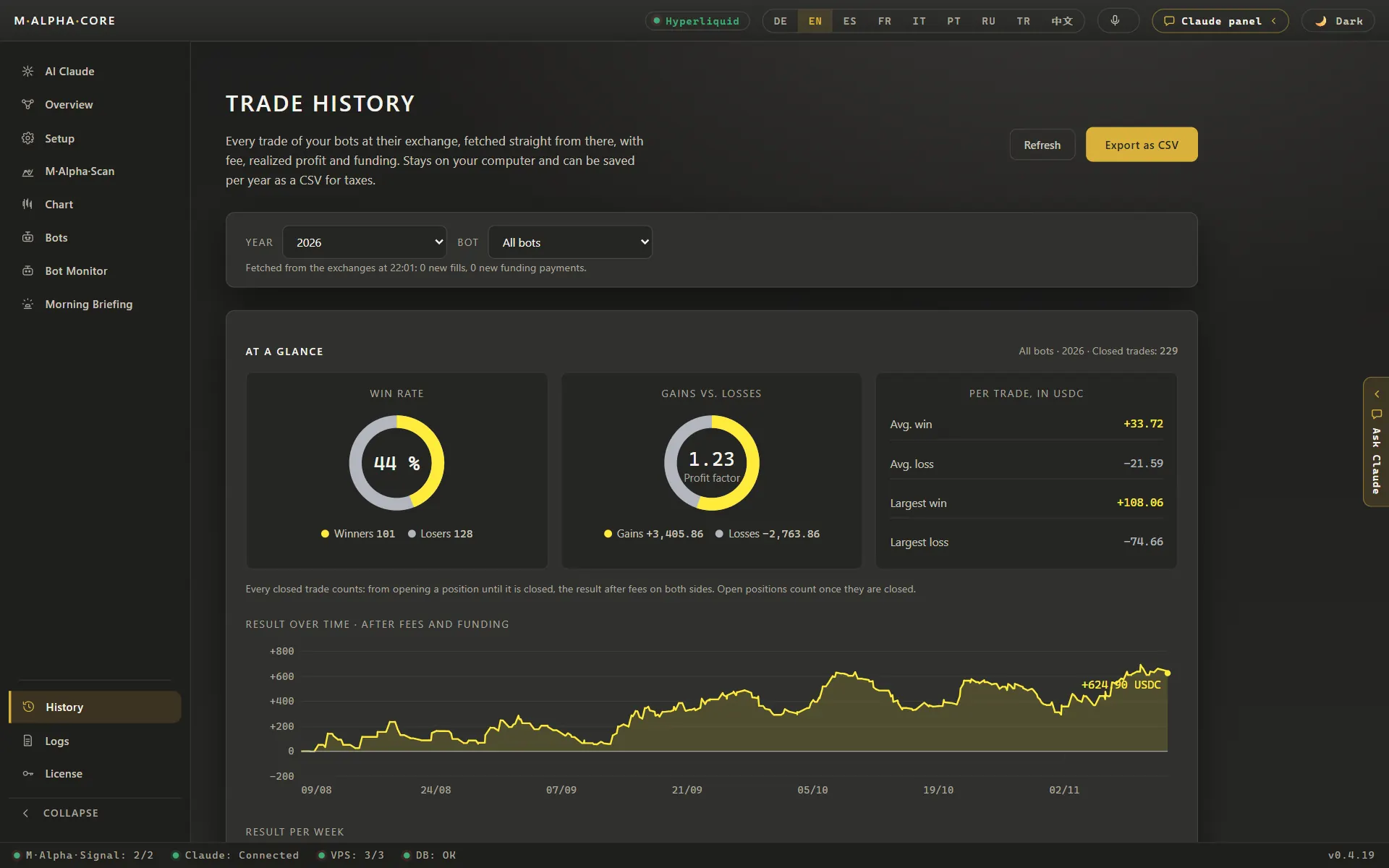
The History tab lists every trade your bots made at their exchange. When you open it, the app fetches the trades straight from the exchange and stores them on your computer: quantity, price, fee, realized profit before fees and funding. At the top you choose the year and the bot, or all bots at once.
Below that, the selection appears as a picture, At a glance:
- two rings, one for the win rate and one for gains against losses, with the profit factor in the middle,
- the average and the largest win and loss per trade,
- the curve of the result over time, after fees and funding,
- bars for each day, and for longer periods for each week or month.
These figures count closed trades, the same way as the final report of a scan: from opening a position until it is closed, after the fees on both sides. The details sit below in sections that open on a click: Totals with trades, realized profit, fees, funding and result, Per bot, and the list of every single fill.
One difference is worth knowing. The tile Trades under Totals counts every single fill. An exchange can fill one order in several parts, so this number is larger than the number of closed trades in the rings above.
Export as CSV for your tax advisor
The button Export as CSV saves the current selection, for example the year 2026 and all bots, as a file. The file is built so that someone else can work with it:
- every fill as its own line, with quantity, price, fee and realized profit,
- funding as one line per day,
- a column Result that is the realized profit minus the fee, or the funding amount on a funding line.
A CSV file opens in any spreadsheet program. Amounts are in the currency the bot reports: USDT or USDC, and USDC on Hyperliquid.
We do not give tax advice, and tax rules differ from country to country. The export gives you complete, sorted raw data. Your tax advisor decides how to use it.
Which bots are included
The history covers bots with an exchange account. You enter the account in the app under Setup, API access, and assign it to the bot in the Bots tab. Testnet accounts are not included, because no real money moves there.
The data comes from where the key is. On Hyperliquid the app asks the exchange directly. On the other nine exchanges it asks your bot on your own server, because only the server holds the exchange key. If the server is switched off, these accounts are missing from the list until it answers again. Nothing is lost: the exchange keeps the trades, and the next fetch brings them in.
The app itself does not trade. The history only reads what your bots did.
Your trades stay with you
The trade history is stored on your computer, not on our servers. Your exchange key stays in the vault of your device and on your own server. Our scan server and our signal servers never see your trades, your balances or your key. The security page describes the whole setup.
A simple routine for the end of the year
- Make sure your bot servers are running, so the app can reach every account.
- Open the History tab, choose the year and all bots.
- Look at the totals: trades, realized profit, fees, funding and result.
- Click Export as CSV and save the file.
- Send the file to your tax advisor, together with the statements your exchanges provide.
You can also export once a quarter. That keeps the file short and lets you spot gaps early, for example a server that was switched off for a while.
Get started
The trade history is part of every license, Standard, Pro and Lifetime. The pricing page lists what each plan includes, and the guide to testing a crypto trading bot shows the way from the first scan to the first live trade.
Frequently asked questions
Does the CSV file contain every single trade?
Yes. Every fill of your bots on accounts with an exchange key appears as its own line, and funding appears as one line per day. Testnet accounts are not included.
Is the export tax advice?
No. The export gives you complete and sorted raw data. Tax rules differ from country to country, and your tax advisor decides how to use the file.
Why are there more lines than trades?
An exchange can fill one order in several parts, and each part is its own line. The rings at the top count closed trades instead, from opening to closing a position.
Which currency are the amounts in?
In the currency your bot reports: USDT or USDC, and USDC on Hyperliquid.
Why is one of my accounts missing?
On every exchange except Hyperliquid the app asks your bot server, because only the server holds the key. If the server is off, that account is missing until it answers again. The trades are not lost, the next fetch brings them in.
Where is the history stored?
On your computer. Our servers never receive your trades, your balances or your exchange key.
Compare M Alpha Core
Side by side with other bot tools, with sources for every statement about them.
Exchanges in M Alpha Core: Binance · Bybit · Bitget · OKX · MEXC · Gate · BingX · KuCoin · Crypto.com · Hyperliquid
Related pages
All figures come from backtests on past market data. No result is a promise of future profit. Trading, especially with leverage, involves high risk. M Alpha Core is a software tool, not investment advice.